

Portable Ashampoo® Office 2008 (v3.00) | 18.5 Mb
This is a complete Office portable paackage. No computer is properly complete without its own Office package. Office assists in the compilation of texts of all kinds, in the completion of spreadsheet calculations and in the preparation of expressive presentations. In these tasks, Microsoft Office is the generally accepted standard, as its formats are established and the functions it offers are continually required. However: many users are unable to afford the Office suite.
This is where the Ashampoo Office 2008 steps in. The program only occupies a limited amount of storage space on the hard drive, is very stable and still offers all of those Office functions which genuinely need to be used in private or in business environments. A fair price that all users can afford without problem also ensures that the Ashampoo Office 2008 is rapidly winning new friends. Its simple menu prompting and ease of use allows users of other Office solutions a problem-free switchover.
It goes without saying that the most important thing is the fact that reading and writing in the original Word, Excel and PowerPoint files without losses of content or in terms of formatting presents no problem for the Ashampoo Office 2008. That means that every user of the Ashampoo Office is able to open, modify and then save a Word file in exactly the same way as if the work had been done in Word itself.
Ashampoo Office 2008 is supplied with the word processing tool Ashampoo TextMarker, the spreadsheet program Ashampoo PlanMaker and – brand new in the current version – the presentations software Ashampoo Presentations.
Ashampoo TextMaker, PlanMaker and Presentations
As a word processing program, Ashampoo TextMaker is able to cope both with long and short texts. The program is able to lay out a table of contents, an index and tables, can import graphics and is also able to place 3D texts. Thanks to the integrated addresses database, drafting serial letters presents no problem. Web pages are also easy to create using the program. The program has also won considerable praise thanks to its very high quality spell check system.
With Ashampoo PlanMaker, number games of all kind no longer present any problems. The spreadsheets offer countless formulae which are a great help with automatic calculations. Its implementation of highlighted columns of figures in expressive 2D and 3D diagrams is particularly effective.
Ashampoo Presentations is a new product. The presentations program brings images and texts together, and using the pre-sets, can easily generate a visual presentation which can then be played back on the PC monitor and can also easily be exported or printed out.
Ashampoo Office 2008: Now with PDF Export and Mailing Assistant
Lots of things have changed in the new Ashampoo Office 2008. And it isn’t just down to the presentation program Ashampoo Presentations, which is a completely new addition to Office.
A particular wish of users was PDF export, something which is now available in all three programs. This means exporting content so that users can open it and print it out is no longer a problem, as long as s/he has installed the free Adobe Reader on their computer.
The object-based exchange of data between the three Office applications is also brand new. This means PlanMaker tables can be easily integrated into an Ashampoo TextMaker document, for instance. A single mouse click on the object is enough at any time to be able to work on it in the original application.
One great extra is the new mailing assistant which is immediately available in Ashampoo TextMaker 2008. This helps in the printing of envelopes and spares its owner the annoying sizing and positioning of address fields.
Download - RapidShare
Read more...
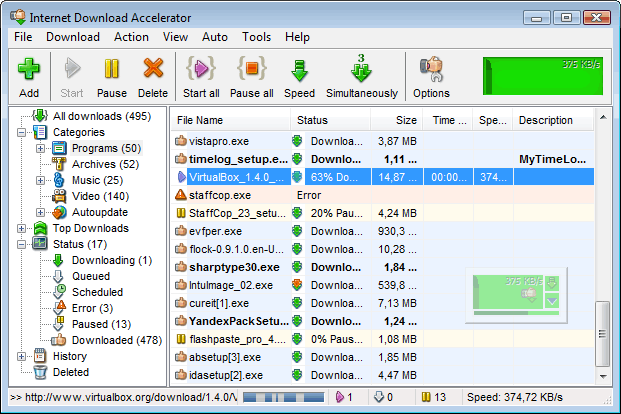
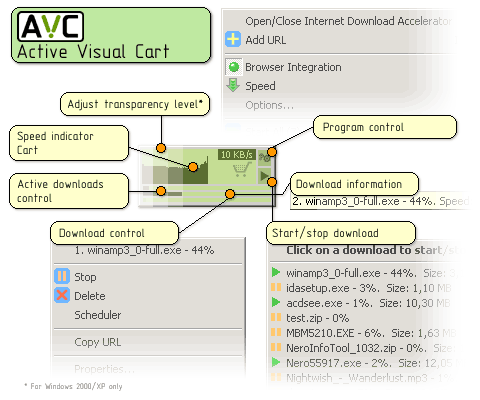
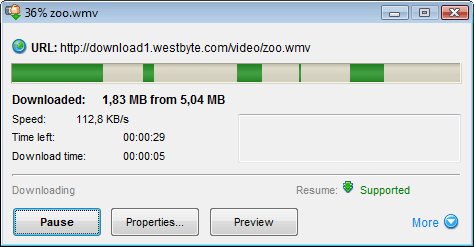
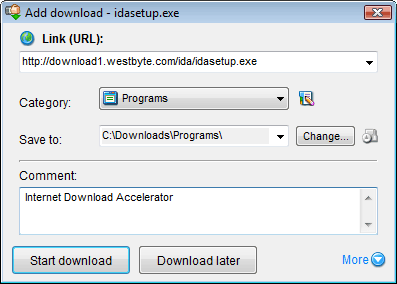
Internet Download Accelerator effectively solves three of the biggest problems when downloading files: speed, resuming broken downloads, and management of downloaded files. IDA AVCInternet Download Accelerator lets you to noticeably increase the speed of file download from the Internet using HTTP, HTTPS and FTP protocols. The acceleration is achieved by splitting a file being downloaded into several parts and downloading these parts at the same time. Internet Download Accelerator resumes broken downloads from where they left off from both HTTP, HTTPS and FTP servers.
To increase usability Internet Download Accelerator integrates with Internet Explorer, Firefox, Google Chrome, Apple Safari, Mozilla, Opera, Nescape and others, replacing the standard download modules. Moreover, the program monitors the system clipboard and detects URLs in the clipboard. With IDA you can download and save video from popular video sharing services: YouTube, Google Video, Metacafe and others.
IDA integrates into IDATop file catalog enabling you to search for files and mirrors right from the program and get information about the most popular software, music, archives, documents etc. Having signed up you will be able to add comments for files, add files to your own Favorites available to you on any computer connected to the Internet.
Whatever your connection type, Internet Download Accelerator will use the bandwidth of your connection most effectively and download files extremely fast.
Power and useful tool for management of download categories. Possibility of automatic file type detection with automatic file placement to the specified categories. Unlimited number of categories and hierarchy levels.
In this pack include:
+ 3 plugins
1- Advanced Scheduler 1.0.2.25
2- Trayindicator 0.3
3- Description 0.2
To install a plug-in download it, unzip (unrar) and copy to "...\Internet Download Accelerator\Plugins\" folder (usually "C:\Program Files\Internet Download Accelerator\Plugins\"), then restart IDA.
+ 6 skins
1- Oskar
2- MediaVista-B
3- MediaVista-G
4- MediaVista-R
5- Noia
6- Noia(24x24)
To install a skin, copy a skin file to the Skins subfolder in the program installation folder. After that for the changes to take effect you have to restart IDA.
What's new ?
+ ListAdded new automatic mode: Reduce download speed if the user's activity detected;
+ ListAdded integration with Google Chrome (download interception) and Apple Safari (download interception);
+ ListImproved integration with Mozilla Firefox: Download with IDA and Download All with IDA items will be added to Firefox context menu after enabling integration with Firefox;
+ ListAdded IDABar for Mozilla Firefox;
+ ListAdded automatic integration with Mozilla Firefox, Google Chrome, Apple Safari and Opera during IDA installation;
+ ListImproved integration with the last Opera versions;
+ ListImproved integration with supported video services and added support for some new ones;
+ ListImproved SSL(HTTPS) support, added support for new certificate types;
+ ListTemplates for automatic Referer substitution now are stored in a text file. Now you can add new templates to that file by yourself;
+ ListZIP and RAR libraries updated;
+ ListUpdated User-Agent list in IDA options;
+ ListNow you can specify "*" wildcard at the beginning of the site name, for example *.site.name;
+ ListAdded option to choose the number of download sections in the Add download window with one click;
+ ListWell-formed XML is used for storing download list;
+ ListModified the way IDA query OS for special OS folders location;
+ ListBugs fixed.
Key feartures:
- FTP Explorer;
- site manager for password and download folders management;
- scheduler;
- download speed control, automatic mode for the most comfortable browsing on the Web;
- dial for dial-up connection;
- search for files, programs, games, and music;
- IDA Bar - a toolbar for Internet Explorer and Firefox.
- Internet Download Accelerator integrates with: Interner Explorer, Netscape Navigator, Firefox, Mozilla, Mozilla Firebird, Opera, Maxthon/MyIE2 (IE), NetCaptor (IE), Phoenix (Mozilla). If Internet Explorer 6.0 or above is installed on your system Internet Download Accelerator integrates with Avant Browser (IE), NeoPlanet (IE)
And much more......
System Requirements:
Internet Download Accelerator is a highly productive download manager for Windows 95, Windows 98, Windows Me,Windows NT 4.0, Windows 2000, Windows XP, Windows Vista and Windows 7.
Download+Portable:-
http://rapidshare.com/files/313476599/Internet_Download_Accelerator.rar